


Super Hearing from Distance
4.6439.00 Reviews
App Specs
- Version
- 1.1.6.5
- Updated On
- License
- Free
- Downloads
- 500,000+
- Developer
- DOSA Apps
- Categories
- Medical
- Platform
- Android
Screenshots
 Analysis by AppCompare
I would approach Super Hearing from Distance as a listening aid for specific situations, not as a way to hear everything perfectly from across a room. Its purpose is to make nearby sound easier to pick out, and that can be useful when ordinary listening feels effortful. The difference between a helpful boost and a wall of distracting noise depends heavily on where you are, how you hold your phone, and what you are trying to hear.
What to expect from the listening response
Sound amplification is immediate in concept, but it is not the same as improving the original sound. A phone microphone can pick up a mixture of voices, movement, and room noise; making that mixture louder does not automatically make one speaker clearer. I would start in a quiet room, listen briefly, and then adjust the level before trying a busier setting. That simple sequence helps me tell whether the app is making a useful difference or merely raising the background.
The app is most promising when the sound source is reasonably close and there is a clear reason to listen: following a person speaking nearby, catching a television more comfortably, or hearing a lecture from a seat where the room is not too noisy. It is less suited to isolating a faraway voice in a crowd. If several people are talking at once, amplification may make the competing voices more noticeable rather than separating them.
How I would use it during a busy day
Picture a family member speaking from the other side of a quiet living room while the television is on. Instead of repeatedly asking them to raise their voice, I would try the app with headphones, keep the phone oriented toward the speaker, and lower the TV if that is practical. The phone’s position matters: placing it near the sound you want can help, but it also means keeping the device steady and close enough to be useful. This is a deliberate listening setup, not a hands-free replacement for normal conversation.
For a class or public talk, I would treat it as a backup rather than my only way to follow along. Arriving early enough to choose a seat nearer the speaker, reducing avoidable noise, and asking for a repeated point are still sensible options. The app may help with the sound reaching the phone, but it cannot guarantee that every word will be intelligible in a reverberant room or when the speaker is far away.
Choosing it over ordinary alternatives
Compared with simply turning up a television or asking someone to speak louder, this app offers a more personal way to raise the sound arriving through the phone. That can be convenient when changing the room’s volume would bother other people. Compared with moving closer, though, it adds a device and headphones to the process, so moving nearer remains the easier choice whenever that is comfortable and appropriate.
It also should not be treated as a replacement for hearing aids or professional advice about hearing. Those options address different needs and can be more suitable for regular or persistent difficulty. I would choose this app for occasional listening assistance and experimentation, not as a diagnosis, a medical treatment, or a dependable solution for safety-critical sounds.
Worth Reading Before You Choose

Flipboard Shows What News Apps Must Do Beyond the Feed

Switching to Android Auto Means Rethinking Your Driving Routine

Google Calendar Makes a Crowded Week Easier to Manage

Ludo King Makes the Most of the Minutes Between Plans

Baby Panda World Brings Quick Play to Modern Phones, but Its Game Library Feels Busy

ESPN’s Live Game View Makes Following Close Games Easier
Small adjustments that make a difference
There are a few practical habits I would use before deciding whether the app works for me. First, test the microphone and headphones at a low volume; sudden amplified sound can be uncomfortable. Next, compare the same short sound with the phone placed in different positions, rather than changing several things at once. Finally, pause between adjustments. If the result gets harsher or noisier, turning the level back down is more useful than pushing it higher.
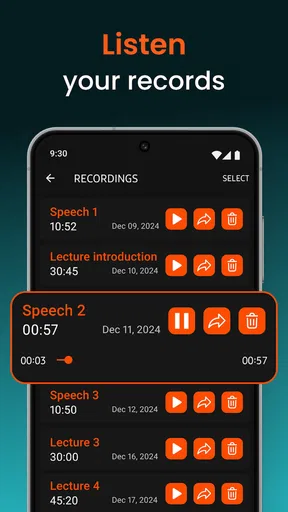
Recording can be convenient for remembering information, but I would be careful about where and why I use it. A saved conversation may involve other people’s privacy, so I would ask permission where appropriate and follow the rules of the setting. For a lecture or interview, taking notes or asking for a recap may be a better choice if recording is not welcomed.
Who should consider it, and who should look elsewhere
I can see this being worth trying for someone who wants occasional help hearing a nearby voice, TV, or talk and is comfortable using a phone and headphones. It may also suit a person who wants to explore how amplification changes the sounds around them. Someone with ongoing hearing difficulty should consider a hearing professional or purpose-built hearing support instead, especially if the problem affects conversations day after day.
I would skip it when I need to monitor traffic, alarms, machinery, or any other sound where missing a cue could put me at risk. Headphones and focused listening can reduce awareness of the surrounding environment. It is also not my first choice in a very loud venue, where extra amplification may make the overall sound more tiring instead of clearer.
First Impressions and Setup
Downloading Super Hearing from Distance was a breeze. It’s available on both Android and iOS, making it accessible for nearly everyone. Once installed, the app greets you with a straightforward interface that’s easy to navigate. No need to be a tech whiz here; everything is laid out simply, allowing you to dive right into its features.
Setting up the app involves a few quick permissions—like access to your microphone—which makes sense, considering that’s the heart of its functionality. Just a quick tap here and there, and you’re all set to explore the world of enhanced hearing.
Features that Stand Out
Once you get past the initial setup, it’s time to delve into what this app can do. The main feature, of course, is its ability to amplify sound. Imagine sitting in a bustling café and being able to focus on a conversation happening a few tables away. This can be a real game-changer for those who need a little extra help in noisy environments.
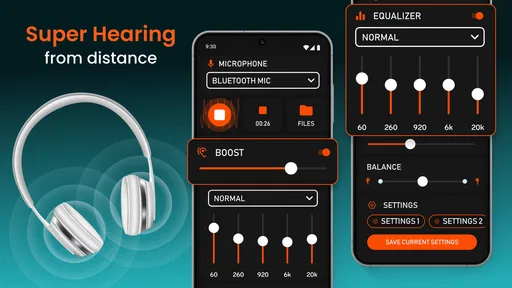
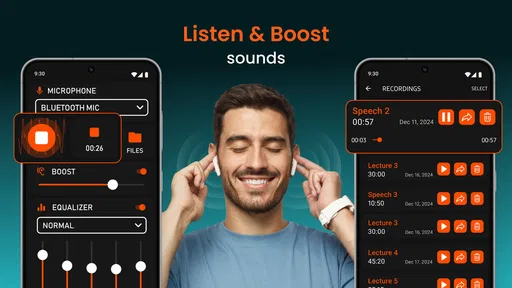
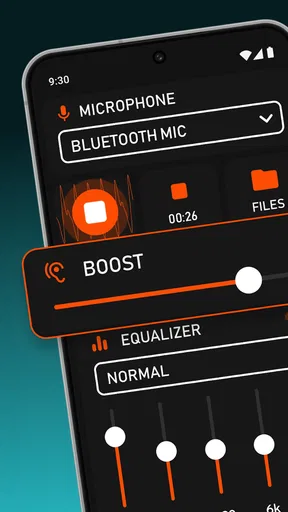
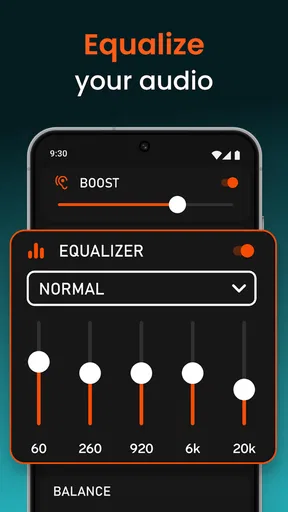
One cool aspect is the app’s ability to adjust the sensitivity of the microphone. You can fine-tune how much sound you want to capture, which is pretty nifty. There’s also the option to save recordings—a handy feature if you’re trying to remember specific details from a conversation.
User Experience
Using the app feels somewhat surreal at first. You pop in your headphones, and suddenly the world around you is buzzing with clarity. I tested it at a local park, and it was fascinating to hear distant conversations and the subtle rustling of leaves as if they were happening right next to me.
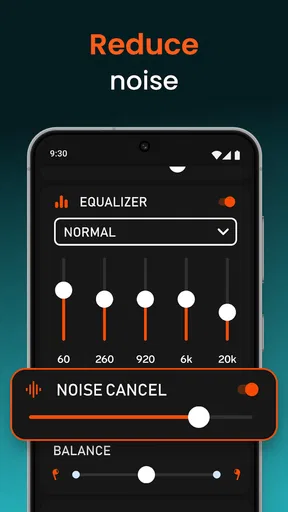
However, it’s not all perfect. Like any technology, there are moments when the app picks up unwanted noise or static, which can be a bit jarring. But with a bit of adjustment, you can usually find a setting that works well for your environment.
Practical Applications
So, who can benefit from this app? It’s not just for the curious eavesdropper. Think about individuals with hearing difficulties who might struggle in crowded settings. This app can be a valuable tool in helping them engage more fully with their surroundings.
Moreover, it could be beneficial for professionals in specific fields. Journalists, for example, might find it useful during interviews in busy environments. It’s these practical applications that make the app more than just a novelty.
What the listing tells you before you install
This is a free medical app from DOSA Apps, with optional in-app purchases ranging from $0.99 to $99.99 per item. I would treat the free option as a way to judge whether the listening approach suits me before spending anything; the broad purchase range is a reason to check the details on the purchase screen rather than assume what an item includes. The app is rated for Everyone, and its current version is 1.1.6.5.
Its average rating is 4.7 from around 12,000 ratings, with about 367 written reviews, and it has passed 500,000 installs. Those figures suggest many people have tried it, but they cannot tell me whether it will perform well with my particular phone, headphones, hearing needs, or surroundings. I would use the first session as a practical test, not as proof that amplification will work equally well for everyone.
Stability, battery habits, and recovery
For a short listening task, I would expect the experience to depend more on the phone’s microphone, headphone connection, and the noise around me than on a complicated workflow. I would keep the phone charged if I planned to listen for a longer stretch, since any app actively using the microphone and audio output can add to ordinary device use. I would not judge it from a single noisy room: a brief test in a quiet place can help separate an environmental problem from an app or device issue.
If the sound becomes distorted, uncomfortable, or unexpectedly loud, I would stop listening and lower the volume before trying again. If the app stops responding, closing and reopening it is a reasonable first step; if sound still does not come through, I would check the headphone connection and the phone’s microphone access. These are basic troubleshooting steps, not a promise that every device issue has the same fix. The key is not to keep turning the sound up when the signal is already unclear.
Phone compatibility is also worth checking before installing. The Android release requires version 5.0 or later. Even on a compatible device, microphone quality and headphone fit can affect the result, so two people may have different experiences in the same room. I would use headphones that sit comfortably and let me hear enough of my surroundings to stay aware; louder is not automatically better, particularly during extended listening.
Privacy and everyday courtesy
Because the app works with sound captured by a microphone, I would be thoughtful about when I activate it. In a private conversation, asking before recording is the considerate approach, and local rules or venue policies may apply. In a shared space, I would avoid treating amplification as permission to listen in on conversations that are not meant for me. That boundary matters as much as finding a useful volume.
For remembering a speaker’s instructions, I would first consider whether a quick note or a request to repeat the key point is simpler. Recording can help in some situations, but it brings extra responsibility: the recording may include other people, and I would want a clear reason to keep it. This is a practical tool for listening, not a substitute for consent or good judgment.
Where this app fits among hearing options
Super Hearing from Distance sits between everyday adjustments and dedicated hearing equipment. Moving closer, reducing background noise, or increasing a TV’s volume is often simpler and does not require keeping a phone in the right position. A phone-based amplifier can be more discreet for one listener, but it relies on the device being near the sound source and on a usable headphone setup. For recurring hearing difficulties, a hearing assessment and suitable assistive devices are more appropriate choices than repeatedly improvising with an app.
I would also keep expectations modest in rooms with echo, several overlapping speakers, or sudden loud sounds. In those conditions, increasing sensitivity can bring up unwanted audio along with the voice I want. A quieter seat or a direct conversation may produce a better result. The useful skill here is learning when amplification is helping—and when changing the environment is the smarter fix.
Final Thoughts
Overall, Super Hearing from Distance offers a unique and intriguing experience. It’s not without its quirks, but for those moments when you need a little extra auditory power, it’s a handy tool to have in your pocket. Whether you’re looking to enhance your hearing for practical reasons or just curious about its capabilities, this app is worth checking out.
Give it a try, and you might just find yourself marveling at the world of sound you’ve been missing!
Pros
- Enhances audio clarity effectively.
- Simple and user-friendly interface.
- Customizable sound settings.
- Lightweight app with minimal storage use.
- Compatible with most headphones.
Cons
- May drain battery quickly.
- Requires internet for full features.
- Some ads can be intrusive.
- Limited support for Bluetooth devices.
- Not suitable for all hearing needs.
FAQs for Super Hearing from Distance
What is the main purpose of the Super Hearing from Distance app?
The Super Hearing from Distance app is designed to enhance your hearing by amplifying surrounding sounds. It uses your device's microphone to capture ambient noise and allows you to listen more clearly, even from a distance. This can be particularly useful for those with hearing difficulties or in situations where you want to hear subtle sounds.
Is the Super Hearing from Distance app compatible with all devices?
The app is generally compatible with most modern Android and iOS devices. However, performance may vary depending on your device's microphone quality. It's important to check the app's requirements on its download page to ensure compatibility with your specific model and operating system version.
Are there any privacy concerns with using this app?
While the app requires access to your device's microphone, it does not record or store any audio data without your consent. It's crucial to review the app's privacy policy to understand how your data is handled and to ensure that it aligns with your privacy preferences.
Does the app require an internet connection to function?
The Super Hearing from Distance app primarily functions offline, as it uses the device's microphone for sound amplification. However, an internet connection might be needed for initial setup, updates, or accessing additional features such as cloud-based sound processing, if available.
What are some common technical issues users might face with the app?
Some users may experience issues like audio lag, feedback noise, or app crashes, often due to device limitations or settings configurations. Ensuring your device is updated and has adequate resources can mitigate these problems. If issues persist, contacting customer support for troubleshooting assistance is recommended.


